Hide outline
Share Blog
Blog
Author:
Was this lesson helpful?
Dive Deeper
Generate a follow-up sub-lesson on any aspect of this topic
Learn how INNER, LEFT, RIGHT, and FULL OUTER JOINs decide which rows survive, where NULLs come from, and how to spot join bugs early with row counts and a short debugging checklist.
A SQL JOIN is not a merge of two tables. It is a rule for pairing rows, and the rule decides what you keep, what you lose, and where NULLs appear. Most join bugs come from misreading that rule, not from bad syntax. The overlap diagram below summarizes which rows each join keeps.
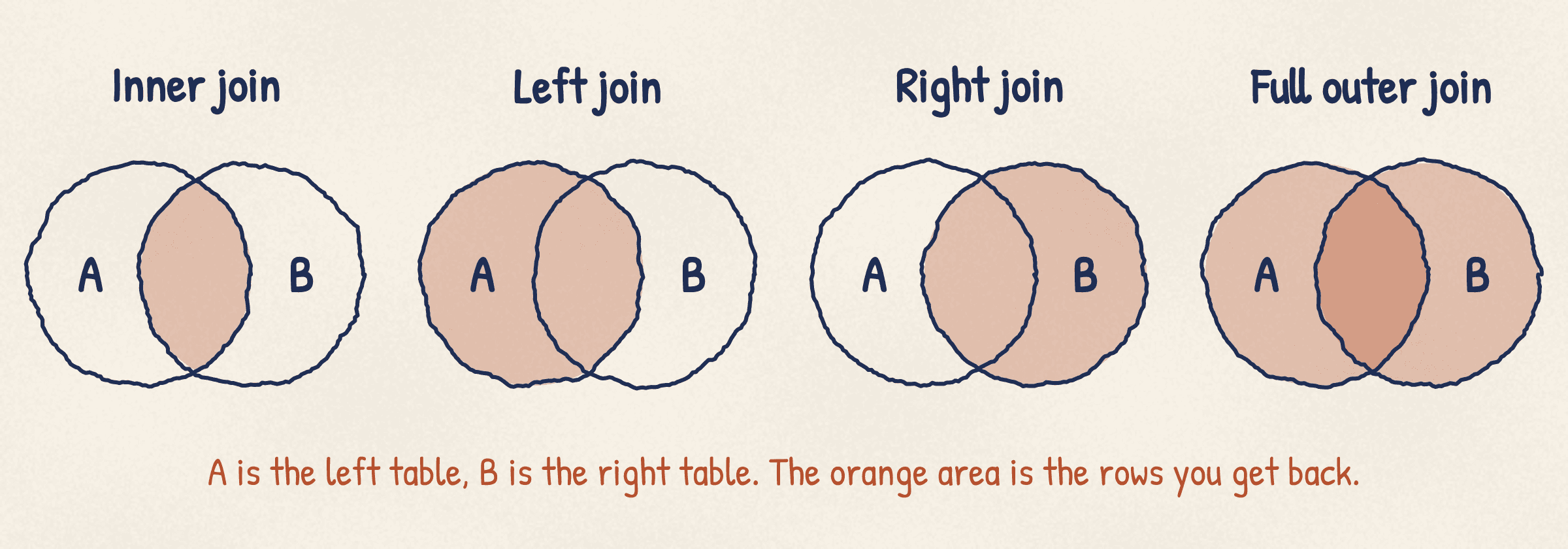
How each join treats the two tables. Shaded areas show which rows are returned.
To predict the actual output, think of a matching game played on keys such as customers.id and orders.customer_id. Each join is a rule for which players get to stay in the game.
An INNER JOIN returns a row only when the ON condition finds a partner on both sides. Orders without a customer vanish, and so do customers without orders. Pick keys that express a real relationship, usually a primary key against a foreign key, and the result stays predictable. The examples in this post use two small tables, so you can follow every row by hand.
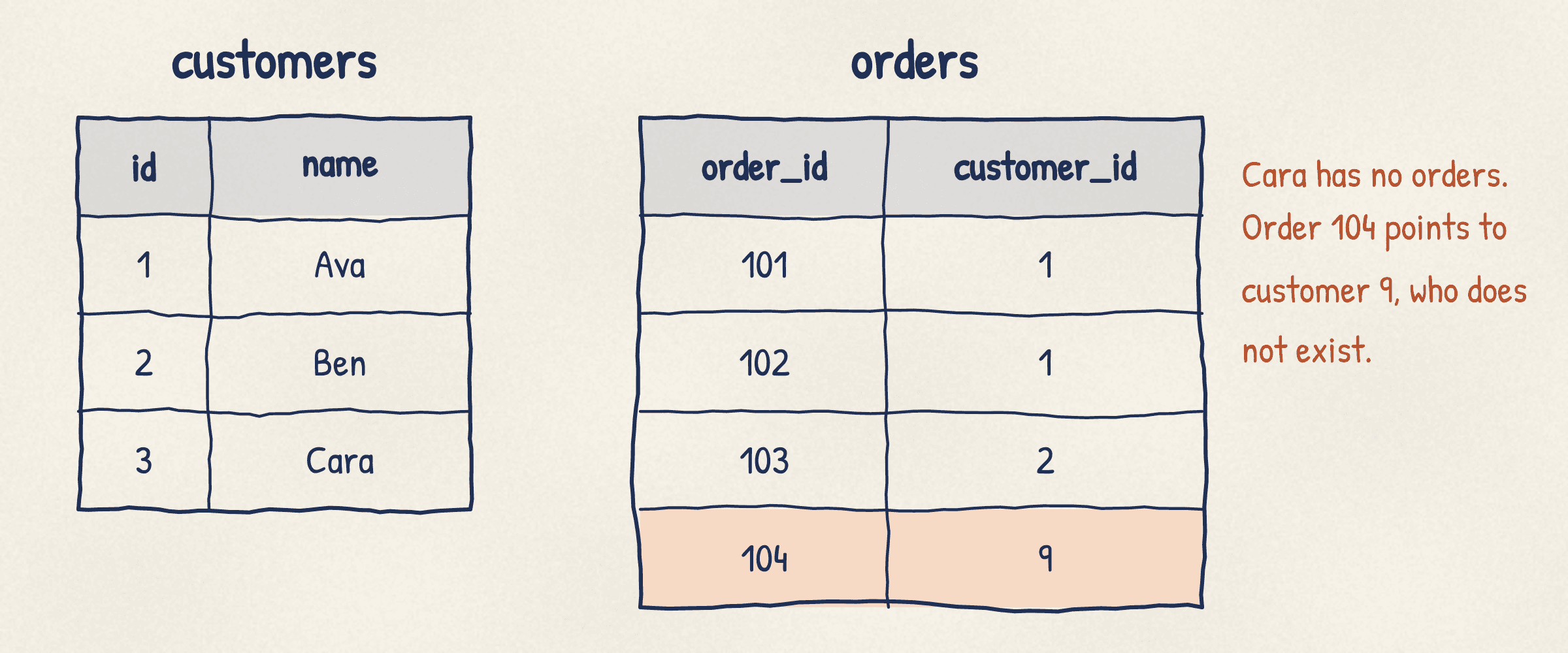
The sample tables used in every example in this post. Cara has no orders, and order 104 points to a customer that does not exist.
SELECT c.name, o.order_id
FROM customers c
INNER JOIN orders o ON o.customer_id = c.id;
Trouble starts when neither side is unique on the join key. If three rows share a key on the left and four on the right, you get twelve rows for that key. This many-to-many explosion inflates sums and counts without any error message.
Check uniqueness Before joining, confirm at least one side is unique on the key with
GROUP BY key HAVING COUNT(*) > 1.
A LEFT JOIN returns every row from the left table, filled with matching right-side data where it exists and NULLs where it does not. A NULL in a right-side column therefore means no match, or a match whose value was genuinely NULL. Those are different facts, so check the key column when you need to tell them apart.
Placement of a filter changes meaning. A condition on the right table inside ON limits which rows can match, so left rows survive. The same condition in WHERE runs after the join and discards the NULL rows, quietly turning your LEFT JOIN into an INNER JOIN.
-- keeps all customers, matches only 2024 orders
LEFT JOIN orders o
  ON o.customer_id = c.id AND o.order_date >= '2024-01-01'
A RIGHT JOIN is a LEFT JOIN with the tables swapped. Most teams standardize on LEFT JOIN and reorder tables, because reading a query top to bottom with one preserved side is easier than tracking a switch midway. Use RIGHT JOIN only when rewriting would hurt clarity, such as in a long chain you are extending.
SELECT c.name, o.order_id
FROM customers c
RIGHT JOIN orders o ON o.customer_id = c.id;
With the sample data, order 104 still appears, but its name is NULL because customer 9 does not exist.
FULL OUTER JOIN keeps unmatched rows from both sides, with NULLs filling whichever side lacks a partner. It shines in reconciliation, like comparing a billing export against a payments table, where a gap on either side matters. Some databases, MySQL among them, lack it, so you may need a UNION of two LEFT JOIN queries.
SELECT c.name, o.order_id
FROM customers c
FULL OUTER JOIN orders o ON o.customer_id = c.id;
Here both gaps show up. Cara appears with a NULL order_id, and order 104 appears with a NULL name.
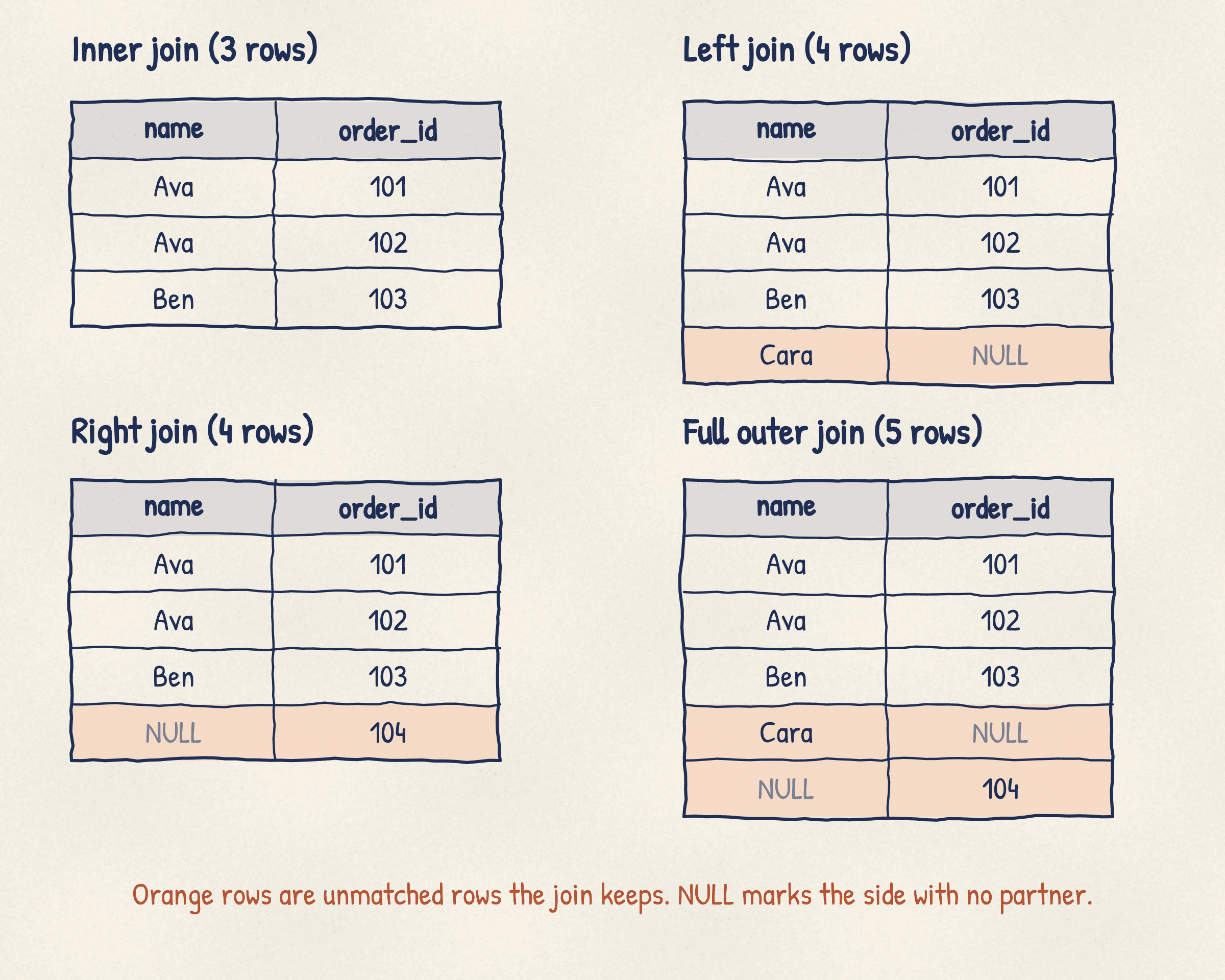
Result of each join on the sample data. Highlighted rows are unmatched rows that the join keeps. NULL marks the side with no partner.
Once you have seen the rows, it helps to keep the rule in one place. The table below condenses what each join does with unmatched rows, so you can scan it when choosing a join.
Four patterns cover most day-to-day work.
LEFT JOIN to add attributes like region or plan without losing base rows.LEFT JOIN plus WHERE right.key IS NULL to find customers with no orders.ROW_NUMBER() filtered subquery so each key appears once.COUNT(*) before and after the join to prove nothing multiplied or vanished.The missing-records pattern is the one WHERE is made for. Filtering on IS NULL of the right key is the right place for a post-join filter, because you want to inspect the non-matches.
When numbers look wrong, work through the same steps every time. Start with row counts. Count the left table, then the joined result. A LEFT JOIN should never return fewer rows than the left table, and more rows signals duplicate keys on the right.
Next, look for unmatched keys by selecting rows where the right key is NULL, and check for mismatches in type, casing, or trailing spaces. Remember that NULL = NULL is not true, so NULL keys never match each other. Then add one join at a time, rerunning counts after each, so the guilty join identifies itself.
One join, one count Add joins singly and record the row count after each. The step where the count jumps is your bug.
Try it on your own data today. Pick a query you trust, count its rows, then rewrite it with an extra LEFT JOIN and see whether the count holds.